
Financial Management in Microsoft Dynamics 365 Business Central
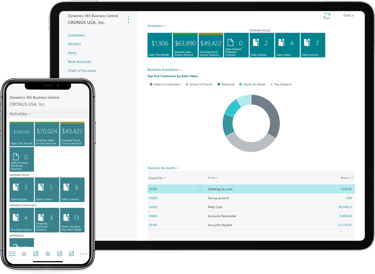
The Finance module in Microsoft Dynamics 365 Business Central is a comprehensive set of tools designed to help organizations manage their financial operations efficiently. It provides powerful features for handling financial transactions, reporting, budgeting, and overall financial management. Below is an overview of key features within the Finance module:
MODULES
1. General Ledger (GL)
Chart of Accounts: Organize financial data using a flexible chart of accounts structure.
Journal Entries: Record financial transactions like invoices, payments, and adjustments.
Automatic Posting: Set up automatic posting rules for streamlined financial operations.
Multicurrency: Handle multiple currencies for global financial transactions with real-time exchange rate adjustments.
2. Accounts Payable
Vendor Management: Maintain a list of vendors with payment terms, discounts, and contact details.
Invoice and Payment Processing: Create and manage vendor invoices, apply payments, and handle payment schedules.
Aging Reports: Track unpaid invoices and monitor vendor outstanding balances through aging reports.
Vendor Reconciliation: Reconcile vendor accounts to ensure accuracy in payments and balances.
3. Accounts Receivable
Customer Management: Store customer information, billing terms, and contact details.
Sales Invoices and Payments: Generate invoices for sales transactions and record payments.
Receivables Aging: Monitor outstanding customer balances and their aging status.
Cash Receipts: Automate cash receipt entries from customers and match them to invoices.
4. Bank Management
Bank Account Integration: Connect and reconcile your business bank accounts within the system.
Bank Reconciliation: Automate the reconciliation of bank transactions to match against the general ledger.
Electronic Payments: Process payments electronically via ACH or other bank systems.
Cash Flow Management: Monitor and manage your organization's cash position and liquidity
5. Fixed Assets Management
Asset Acquisition and Disposal: Track and manage assets as they are acquired, depreciated, and disposed of.
Depreciation Methods: Support for multiple depreciation methods, such as straight-line and declining balance.
Asset Tracking: Manage assets throughout their lifecycle and maintain accurate financial records.
Asset Reporting: Generate detailed reports on asset value, depreciation, and other relevant metrics.
6. Budgets
Budget Creation: Define budgets for various financial dimensions, such as departments or projects.
Budget Variance Analysis: Compare actual performance against budgeted values to track financial performance.
Multiple Budget Versions: Maintain different versions of budgets (e.g., for different periods or scenarios).
Real-Time Updates: Automatically update budgets with actual expenses and revenues.
7. Financial Reporting & Analysis
Standard Reports: Pre-built financial reports like Balance Sheets, Income Statements, and Cash Flow Statements.
Customizable Reports: Create custom financial reports using a user-friendly report designer.
Key Performance Indicators (KPIs): Define and track financial KPIs to measure business performance.
Financial Dimensions: Organize reports by financial dimensions like departments, projects, or locations.
8. Tax Management
Tax Setup: Configure tax rates, tax codes, and tax groups based on your local regulations.
Tax Calculation: Automatically calculate sales tax, VAT, and other applicable taxes on transactions.
Tax Reporting: Generate tax reports and forms for compliance with regional tax authorities.
9. Multi-Company and Consolidation
Multi-Company Support: Manage finances across multiple companies in one system.
Consolidation: Consolidate financial data across subsidiaries or departments for reporting purposes.
Intercompany Transactions: Handle transactions between related entities and automate intercompany accounting.
10. Audit Trail & Security
Audit Logging: Track changes to financial data for compliance and auditing purposes.
Role-based Security: Control access to financial data with role-based permissions, ensuring sensitive financial information is restricted.
11. Cost Accounting
Cost Centers & Profit Centers: Track and analyze costs by different business units or departments.
Job Costing: Manage costs associated with specific projects or jobs.
Allocation: Automatically allocate costs to various cost centers or profit centers.
12. Automation and Workflow
Approval Workflows: Set up approval workflows for payments, invoices, and journal entries to ensure proper oversight.
Recurring Transactions: Automate recurring entries for payments, subscriptions, or other regular transactions.
Electronic Invoicing: Automate invoice generation and submission electronically to customers and vendors.
13. Financial Forecasting
Scenario Planning: Build financial forecasts based on various business scenarios.
Predictive Analytics: Use data insights to predict cash flow, revenue, and expense trends
14. Integration with Other Modules
Sales & Purchase Integration: Link financials directly with sales, purchasing, and inventory modules to streamline processes.
Project Management: Integrate financials with project management to track project budgets and costs.
Manufacturing: Connect financial data with the manufacturing module for production costs and profitability analysis.
The Finance module in Business Central integrates seamlessly with other modules like Sales, Purchasing, Inventory, and Project Management, ensuring all aspects of financial management are covered and that the system remains flexible for businesses of all sizes.

Get in touch
Book a free consultation today to discover how we can help take your business to the next level.


About Us
Copyright © 2026 | Leaforge Technologies All Rights Reserved.
Leaforge is a Microsoft Dynamics 365 Business Central implementation partner helping growing businesses streamline operations and scale with confidence.
Our Solutions
Microsoft Dynamics 365 Business Central
Our Service
Implementation
Migration
Support
Training
Development

E-mail : Support@leaforge.com